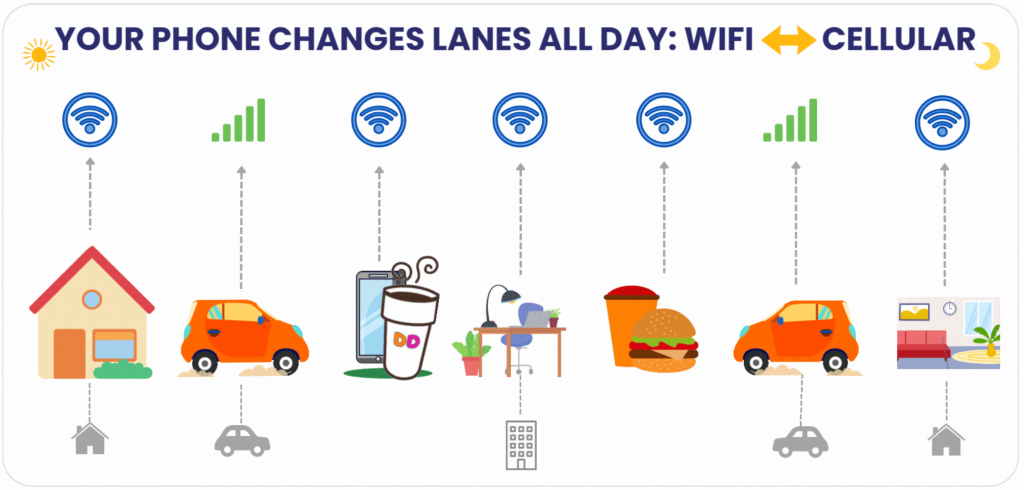

Your phone isn’t loyal.
It wakes up with you in the morning, faithful to your home Wi-Fi.
But the second you step outside, it ghosts you. Cellular takes over.
All day long, your phone plays the field. Wi-Fi. Cellular. Back to Wi-Fi. Then cellular again.
And that’s not a bug. That’s brilliance.
Morning: Coffee, Wi-Fi, and Betrayal
Picture this:
You’re half-awake, scrolling headlines on your couch. Home Wi-Fi does the heavy lifting. No drama, just fast signal and smooth scrolling.
Then you grab the keys, step outside, and—poof—it’s gone. Your phone abandons Wi-Fi without so much as a goodbye. Suddenly, it’s back in the arms of cellular.
On the drive to work, you swing by Dunkin. Coffee. Donut. A quick check of email before the day explodes. The phone notices the in-store Wi-Fi, decides it’s better than 5G in that moment, and switches back without asking.
To you, nothing happened. The coffee tastes the same. Your email loads. But in the background, your phone is speed-dating networks like it’s auditioning partners.
Midday: The Office Affair
You walk into work or school. Instantly, the phone recognizes the enterprise Wi-Fi and reconnects. No password. No portal. Just there.
Lunch break? Someone suggests burgers. You pile into a booth, unwrap your order, and notice nothing at all, because your phone quietly decided that the restaurant’s Wi-Fi beats the cellular trying to punch through brick walls.
Back in the car, cellular reclaims the throne. And by the time you get home, you’re back where you started. On your couch. On your home Wi-Fi.
Your phone has switched networks more often than you’ve switched moods today. And yet every app works. Every call connects. Every scroll feels smooth.
Why Your Phone Cheats
It feels fickle. But it’s actually smart.
- Walls are brutal: Concrete, metal, and coated glass can make even 5G stumble indoors.
- Wi-Fi is often faster inside: At restaurants, gyms, hotels, and clinics, Wi-Fi carries the weight.
- Cellular shines outside: Towers cover the open air better than any indoor network can.
- Battery is precious: Your phone prefers whichever path burns less energy.
It’s not chasing signal for fun. It’s protecting your experience.
The Brain Behind the Magic
Your phone is constantly monitoring the algorithms of both Wi-Fi and cellular:
- Measuring signal strength.
- Checking speed and stability.
- Deciding which path delivers the smoothest experience.
Think of it like city traffic. You don’t stay stuck on one clogged road. You take side streets, merge onto highways, reroute as needed. Your phone does the same, silently.
Why This Works So Well: Wi-Fi Carrier Offloading
Here’s the real engine: Wi-Fi Carrier Offloading.
That’s when your mobile carrier decides your phone connection should be transferred from their tower to trusted Wi-Fi. It usually happens indoors, at common places like restaurants, gyms, hotels, urgent care clinics, and Dunkin! — where Wi-Fi is stronger.
Offloading improves Indoor Cellular Coverage by smoothing out dead zones, keeping apps responsive, and easing the load on cellular towers. The In-Building Connectivity provided by Wi-Fi Carrier Offloading is one of the quiet reasons your phone feels faster inside.
The Beauty of Passpoint®
But offloading alone isn’t enough. The magic trick is Passpoint®.
Passpoint® is a trademarked technology created by the Wi-Fi Alliance. It was designed so phones could connect to trusted Wi-Fi automatically, without log-in screens or pop-up portals.
Think of Passpoint® like a digital passport for Wi-Fi. Once your device has the profile, it recognizes participating networks and joins securely. That’s how you can walk into Dunkin, a hotel, or a clinic and be online instantly.
Passpoint® matters because it elevates Indoor Cellular Coverage and In-Building Connectivity from hit-or-miss to seamless. It’s fast, invisible, and secure.
Why Carriers and Venues Care
- Carriers: Offloading to Wi-Fi keeps towers clear for people outside. Better service for everyone.
- Venues: Guests order, pay, and stream without complaining about dead zones.
- Users: Apps stay alive, calls connect, videos don’t buffer.
This isn’t about loyalty to one network. It’s about continuity for the experience.
Security Without the Headache
Automatic switching might sound risky. But with Passpoint®, it isn’t.
Unlike random “Free Wi-Fi” hotspots, Passpoint® uses enterprise-grade encryption like WPA2-Enterprise and WPA3-Enterprise. Your phone only joins Wi-Fi networks it knows are trusted by the carrier.
And the best part: no captive portals, no guest Wi-Fi passwords. You just connect automatically, while carrier-grade encrypted security runs in the background.
The Big Picture
Your phone’s constant switching isn’t dysfunction. It’s design.
- Guests don’t notice smooth coverage. That’s the baseline they expect.
- What they do remember are dropped calls and frozen apps.
- Venues protect their brand by eliminating those moments.
- Carriers scale without endless tower construction.
Wi-Fi Carrier Offloading and Passpoint® are the unsung heroes making that happen. Together, they transform indoor connectivity from frustrating to invisible.
Evening: Back Where You Started
By the end of the day you’re back home. Shoes off. Dinner finished. Netflix glowing.
And your phone? It’s back on home Wi-Fi, as if it never strayed.
But all day long it’s been switching. Protecting you. Keeping apps alive. Making sure you never noticed the hard work happening in the background.
Your phone isn’t loyal. It’s practical. It cheats for your benefit.
And that’s why it’s a good thing.